British IPTV: UK Television at Home, Abroad and on Holiday
British IPTV brings UK channels, sport, films and series to your screen over the internet, so they go wherever you have a steady connection. This guide is for viewers abroad, owners of a second home and families in the UK who want channels from home as well.
British IPTV is UK television delivered over the internet instead of through an aerial, a dish or a cable box, so the channels go wherever your internet connection goes. With IPTV for UK, one account brings the UK channel group, live sport and more than 90,000 films and series to a Smart TV, a Firestick, a phone or a computer, at home in Britain or abroad.
This guide is written for three kinds of viewer: British people who live abroad or spend long stretches away, international families in the UK who want British channels alongside channels from home, and anyone who wants British sport, films and series in one place. It covers the account, the devices you take with you, the connection you need and the channel groups by country.
Some subjects have their own guides. Choosing features for the people in your home is covered in how to choose an IPTV service, and plan lengths and prices are explained in the IPTV subscription UK guide.
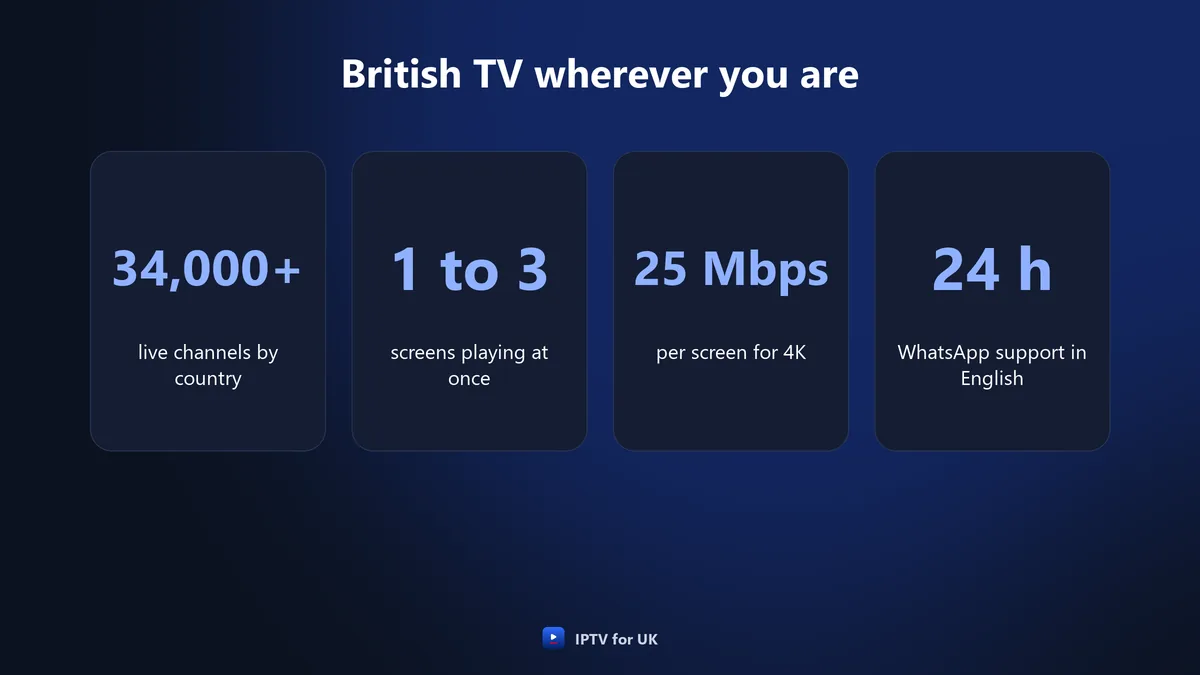
Support in English on WhatsApp, 24 hours a day.
1, 2 or 3 screens, one payment, no contract.
What British IPTV is
British IPTV is a television service that reaches your screen over the internet and carries UK channels for British viewers. A player app on your device receives the channels from the provider’s servers through your broadband or mobile connection. Nothing comes through an aerial on the roof or a dish on the wall.
That is why location matters less than it does with an aerial or a satellite dish. An IPTV line only needs an internet connection, so the question when you are away is not where you are but how steady the connection is.
What the UK channel group includes
With IPTV for UK, the live channels are grouped by country and by theme. UK channels have their own group, including regional variations for England, Scotland, Wales and Northern Ireland. How the four nations and their regions are organised is explained in the United Kingdom IPTV guide.
| Part of the service | What IPTV for UK provides |
|---|---|
| Live channels | More than 34,000, grouped by country and by theme |
| UK group | Regional variations for England, Scotland, Wales and Northern Ireland |
| On demand | More than 90,000 films and series, including complete box sets |
| Picture | 4K on the main sport, film and entertainment channels |
| TV guide and catch-up | Pause live TV and rewind on live channels |
| Screens | 1, 2 or 3 playing at the same time, depending on the plan |
| Support | In English on WhatsApp, 24 hours a day, every day |
British IPTV abroad: what changes and what stays the same
Very little changes when you take British IPTV abroad. IPTV for UK works abroad wherever there is an internet connection, so your account, your login details and the iBO Player app are the same in Spain, Portugal, Cyprus, Dubai or Australia as they are in your living room in Britain.
| What you use | At home in the UK | Away from the UK |
|---|---|---|
| Account and login details | Your own line | The same line |
| Player app | iBO Player, or another player | The same app and login |
| Devices | Smart TV, Firestick, phone, computer | The devices you take or set up there |
| Connection | Your home broadband | The connection where you stay |
| Support | WhatsApp in English, 24 hours a day | The same WhatsApp support |
| Payment | In pounds | In pounds |
The one thing that does change is the connection. At home you know your broadband and where the router sits. Away, you are using the connection in an apartment, a villa, a hotel or on a mobile network, and the picture depends on its speed and how steady it is. The speed figures are further down this guide.
If you have never used British IPTV before, set it up at home first. You learn the app on a connection you already trust, and anything that goes wrong later is easier to trace to the connection where you are staying.
Living abroad or spending the winter away
If you live abroad all year or for part of it, British IPTV gives you one place for the UK channels, the sport and the on-demand library, on a supported Smart TV, a Firestick or an Android box in your home there. Nothing about the account depends on your address.
| Your situation | What tends to fit | Where to read more |
|---|---|---|
| You live abroad all year | A device installed in your home there | Devices section of this guide |
| Winters away, the UK home empty | One account; the device away plays while the one at home is off | Holiday home section |
| Family in both places watching at once | A plan with 2 or 3 screens | Holiday home section |
| Working abroad for a few months | A phone or tablet plus a Firestick | Firestick section |
| Short holidays | A Firestick in your suitcase | Firestick section |
| A family in the UK with roots elsewhere | The UK group plus your home country’s group | Families section |
Moving with your account
You do not change the account when you move. On a new device you install iBO Player and add your line, and the channel list loads as it did at home. On a Smart TV, the app shows a MAC address and a device key: you send both on WhatsApp and restart the app after confirmation.
Long stays and the 1-screen rule
A 1-screen plan can be installed on several devices, but only one plays at a time. If you spend the winter in Cyprus and the summer in Britain, that can be enough: the TV at your UK home is off while you are away, and the one abroad is off when you come back.
Taking a Firestick on holiday
A Firestick is a simple way to take British IPTV on holiday. It is small, it plugs into a TV’s HDMI port, and once iBO Player is installed and logged in, it opens your channel list wherever you connect it to the internet.
Set it up before you leave
Do the installation at home, where you know the connection works. On a Firestick, install the Downloader app, allow apps from unknown sources, enter the code 481220 and install iBO Player, which takes about two minutes. Then log in, open a few channels, check the TV guide and try catch-up, so you know everything works before you pack.
What to pack
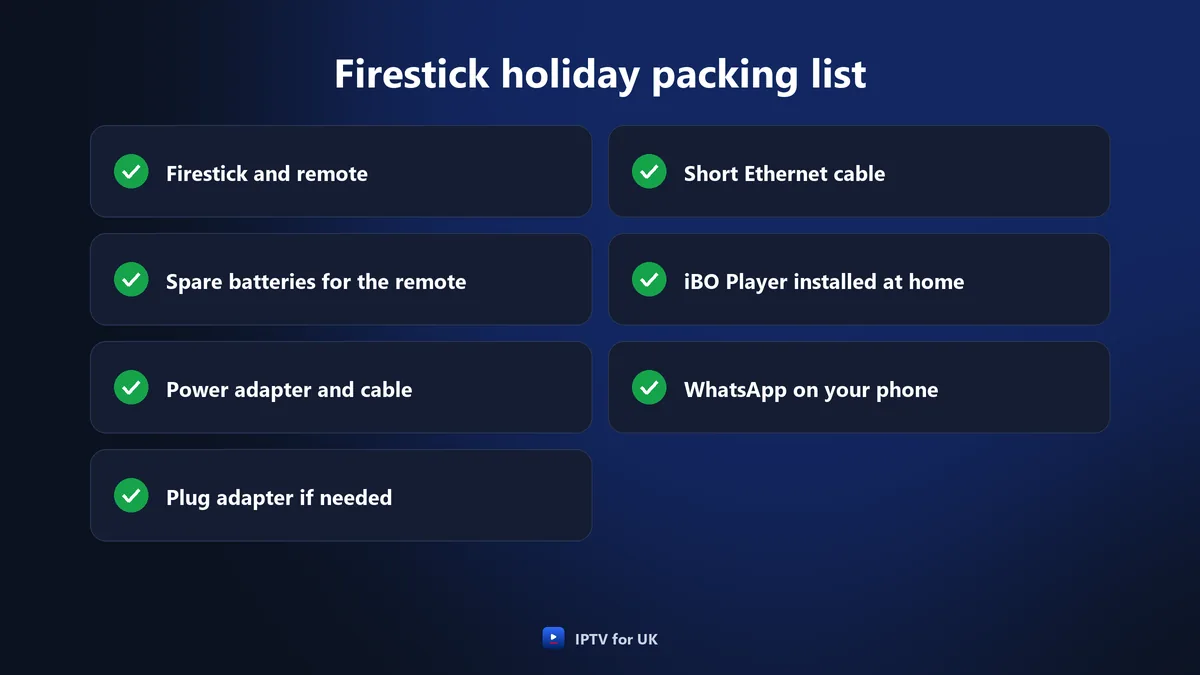
- The Firestick and its remote, with spare batteries.
- The power adapter and cable that came with the stick.
- A plug adapter, if the sockets where you stay are not British.
- A short Ethernet cable and the stick’s Ethernet adapter, if you own one.
- Your phone with WhatsApp, to reach support.
On arrival
Plug the Firestick into a free HDMI port, switch the TV to that HDMI input and connect the stick to the Wi-Fi where you are staying, using that network’s name and password. Open iBO Player. If the picture pauses, choose a lower version of the channel (Full HD, HD or SD) or move the stick’s connection closer to the router.
British IPTV in a holiday home or second home
For a place you return to again and again, leave a device installed there. A Firestick or an Android box set up once is ready on each visit, and you do not need to carry anything between the two homes.
One screen or two?
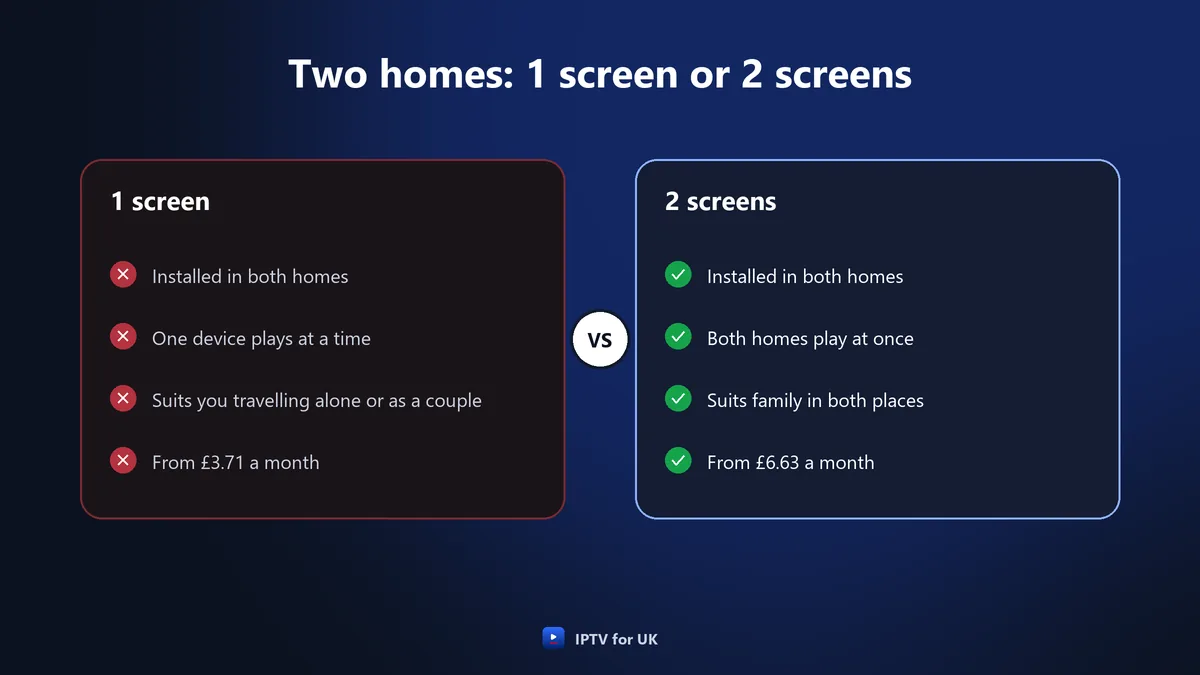
The answer depends on whether both homes watch at the same time. With 1 screen, the line can be installed in both places, but only one device plays at a time. If relatives use the holiday home while you watch in the UK, a plan with 2 screens lets both play at once, and 3 screens cover a third TV.
If the real question is who watches what inside one home, the guide to choosing an IPTV service works through it household by household. For a second home, the screen count is usually the only decision that changes.
The connection you need for British IPTV abroad
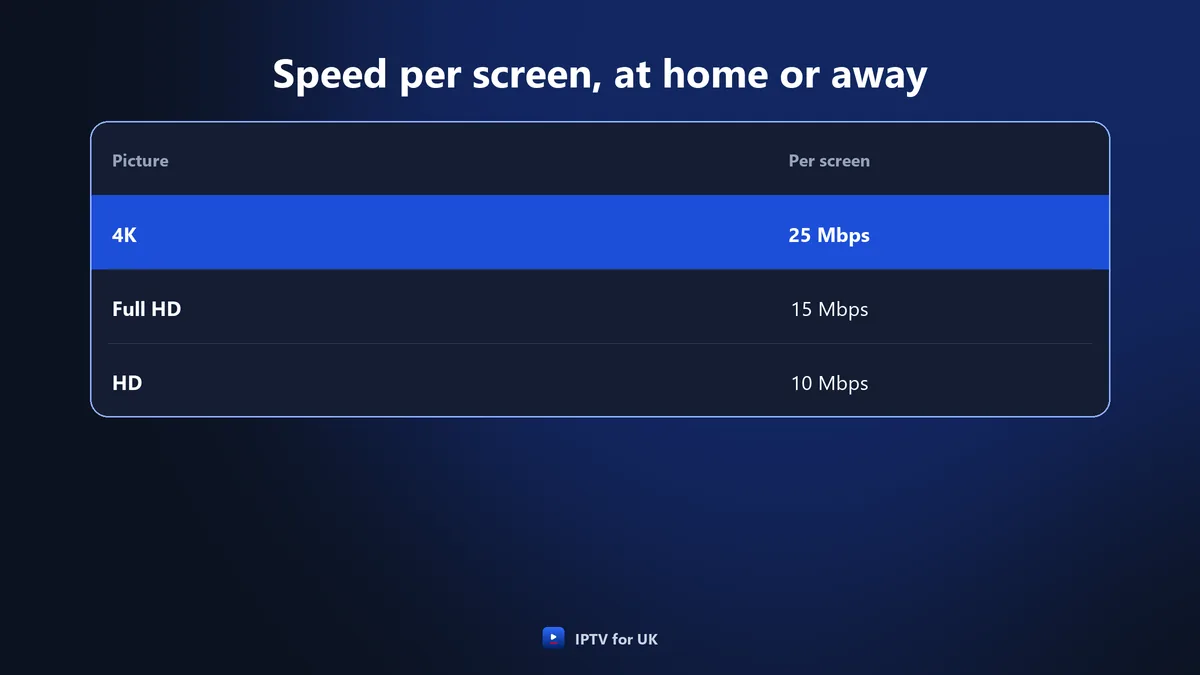
For each screen playing at the same time, allow 10 Mbps for HD, 15 Mbps for Full HD and 25 Mbps for 4K. These figures are the same wherever you watch. The difference abroad is that you may not know the connection before you arrive.
| Picture | Speed per screen | When to use it |
|---|---|---|
| 4K | 25 Mbps | Main sport, film and entertainment channels on a fast, steady connection |
| Full HD | 15 Mbps | The step down when 4K pauses |
| HD | 10 Mbps | Slower connections |
| SD | No figure published | The version to try last on a weak connection |
IPTV for UK works on full fibre, part-fibre, cable, 4G and 5G as long as the connection is steady. Steadiness matters as much as the speed itself: a connection that drops out for a few seconds pauses the picture, even if it is fast the rest of the time.
Check the connection on arrival
Run a speed test on the device you will watch on, or on a phone held next to the TV, and compare the result with the table. Test again at the time of day you usually watch. If two screens will play at once, add the figure for each one.
Wi-Fi in a villa or an old house
Wi-Fi fades through thick brick walls and across floors. In a rented house or an apartment, an Ethernet cable, a powerline adapter or a mesh point near the TV gives a steadier picture. A Firestick has no Ethernet socket of its own, so it needs an Ethernet adapter to use a cable.
Mobile data
On 4G or 5G, the same figures per screen apply. Video uses a lot of data, so check your allowance before you watch for long on a phone or through a hotspot.
Using British IPTV with a VPN
IPTV for UK works with a VPN. Using one is your choice: the service works abroad wherever there is an internet connection, and it also works if you route that connection through a VPN.
A VPN sends your traffic through another server before it reaches the internet, and that extra step can lower the speed. If you watch with a VPN switched on, run the speed test with it active and compare the result with the figure for your picture quality.
- Picture pauses with the VPN on: test the speed with it on, then with it off.
- Speed below 25 Mbps with the VPN on: choose the Full HD version of the channel.
- Still unsure where the problem is: send a message to support on WhatsApp.
One account at home and away
Your login details do not depend on where you are, and on renewal they stay the same, so the devices you have set up keep the same details from one plan to the next.
Support is in English on WhatsApp, 24 hours a day, every day. WhatsApp runs over the internet, so you reach the same team from wherever you are staying, and guided set-up on WhatsApp takes under ten minutes. You can also write to support@iptvforuk.com.
There is no contract, no automatic renewal and no Direct Debit, and each subscription ends on its expiry date. That fits time abroad that does not follow a fixed pattern: you renew when you decide to.
British IPTV for international families in the UK
For families in the UK with roots in another country, British IPTV and channels from home sit in the same account. IPTV for UK groups its live channels by country: the UK has its own group, and so do Ireland, the United States, India, Pakistan, Poland, France, Spain, Italy, Germany and Türkiye, along with Arabic channels and many more countries.
| What the family wants | How IPTV for UK covers it |
|---|---|
| British channels | The UK group, with regional variations for the four nations |
| Channels from home | Country groups such as Ireland, India, Pakistan, Poland, Türkiye and Arabic channels |
| Two rooms watching at once | A plan with 2 screens |
| Three TVs at once | A plan with 3 screens |
| Films and series | More than 90,000 on demand, most with English audio or English subtitles |
| Help in English | WhatsApp support, 24 hours a day |
Two screens for two kinds of TV
When grandparents watch channels from their home country in one room while the children watch UK channels in another, two screens are playing at once. A 1-screen plan only plays on one device at a time, so a household like this needs 2 or 3 screens.
Finding the right group
Because channels are grouped by country and by theme, you open the group you want instead of scrolling through one long list. The TV guide shows the programmes on the live channels, and catch-up lets you pause and rewind.
British sport wherever you watch
The sport on IPTV for UK covers British football from the Premier League to the Scottish Premiership, rugby, cricket and Formula 1, with 4K on the main sport channels. Pay-per-view events have their own category.
| Sport | Competitions and events |
|---|---|
| Football in Britain | Premier League, EFL Championship, FA Cup, Scottish Premiership |
| European football | Champions League, Europa League, LaLiga, Serie A |
| Rugby | Six Nations, Premiership Rugby |
| Cricket and motor racing | Test cricket, Formula 1 |
| Combat sports | Boxing, UFC |
| Other sport | Darts, snooker, tennis, golf |
| Big events | Pay-per-view, in its own category |
The main sport channels come in 4K, with Full HD, HD and SD versions. That matters on a connection you do not know: dropping from 4K to Full HD can keep a match playing where the 4K version would pause.
Catch-up during a match
Catch-up lets you pause live TV and rewind, so a knock at the door or a call from home does not mean missing a goal or a try. The TV guide shows what is on each sport channel.
Films and series on demand for British viewers
The on-demand library of IPTV for UK holds more than 90,000 films and series, including complete box sets, and new titles are added every day. Most come with English audio or English subtitles.
On demand suits life away from home, because nothing is tied to a schedule: a film or an episode starts when you press play. A complete box set gives you a series from its first episode to its last, at your own pace.
Devices for British IPTV at home and away
British IPTV with IPTV for UK plays on Samsung (Tizen) and LG (webOS) Smart TVs, Android TV, Google TV, Android boxes, MAG boxes, the Amazon Firestick, Apple TV, Nvidia Shield, Xbox, iPhone, iPad, Android phones and tablets, Windows, Mac and a web player. Set-up takes about five minutes.
| Device | How it is set up |
|---|---|
| Firestick or Android TV | Install Downloader, allow apps from unknown sources, enter 481220, install iBO Player |
| Samsung or LG Smart TV | Install iBO Player from the TV’s app store, send the MAC address and device key on WhatsApp, restart the app after confirmation |
| iPhone or iPad | Install iBO Player from the App Store, then enter the login details |
| Android phone or tablet | Install iBO Player from Google Play, then enter the login details |
| Other player apps | Use the M3U link or the Xtream Codes login in IPTV Smarters or TiviMate |
Each Smart TV shows its own MAC address and device key, so a TV in a second home goes through the same steps as the one at home. The installation page has the full steps for Firestick, Smart TVs, Android and iPhone or iPad; for any other device, ask support on WhatsApp.
Guided set-up on WhatsApp takes under ten minutes.
Test British IPTV before a long stay
Try British IPTV on the devices you plan to take before you rely on it. IPTV for UK offers a free 1-hour trial with full access and no payment, one per customer, and a 24-hour trial for £2.95 with full access, which is taken off the first subscription.
- Open the UK group and the regional channels for your part of the UK.
- Watch a live match in 4K, then switch to the Full HD version.
- Pause and rewind with catch-up.
- Start an episode of a box set from the library.
- Open the group for your family’s home country, if you need one.
- Send a question to support on WhatsApp and see how the reply helps.
Every first subscription has a 7-day refund, after you contact support first so a technician can try to fix the problem. It does not cover renewals, the 24-hour trial, requests after 7 days, or problems caused by your own connection or by a third-party app. That last point matters when you travel: check the connection where you will watch, not only the channels. The details are on the refund policy page, and the trials on the free trial page.
£2.95, taken off your first subscription.
Plans, prices and the other guides
Prices start from £3.71 a month on the 24-month plan with 1 screen, and every plan is one payment for the whole period, with no set-up fee and no contract. The IPTV subscription UK guide explains the plan lengths, the price per month and how to order.
To judge the company behind a line before you pay, read how to choose an IPTV provider. For the four nations, their regional channels and broadband inside the UK, see the United Kingdom IPTV guide.
In the UK, a TV Licence is required to watch or record programmes as they are shown live on any channel or service, on any device, and a subscription does not include one or replace one (the full wording).
1, 2 or 3 screens, one payment, no contract.
How this guide was written
This guide was prepared for IPTV for UK with the help of AI writing tools. Its prices, trial terms, refund conditions, device steps and speed figures are the ones published on this site. If you spot something that looks out of date, tell us through the contact page.
Frequently asked questions
- Does British IPTV work abroad?
- Yes. IPTV for UK works abroad wherever there is an internet connection, with the same account, login details and iBO Player app as at home. Allow 10 Mbps for HD, 15 Mbps for Full HD and 25 Mbps for 4K for each screen playing at the same time, on a steady connection.
- Can I take a Firestick with IPTV for UK on holiday?
- Yes. Install iBO Player on the Firestick at home: the Downloader app, apps from unknown sources allowed, code 481220. On holiday, plug it into the TV’s HDMI port and connect it to the Wi-Fi. A 1-screen IPTV for UK plan can be installed on several devices, but only one plays at a time.
- Does IPTV for UK work with a VPN?
- Yes, IPTV for UK works with a VPN, at home or abroad. A VPN can lower the speed, so test with it switched on and compare the result with the figures: 10 Mbps for HD, 15 Mbps for Full HD and 25 Mbps for 4K for each screen playing at the same time.
- Which countries have their own channel groups?
- IPTV for UK groups its 34,000+ live channels by country and by theme. Besides the UK group, with regional variations for England, Scotland, Wales and Northern Ireland, there are groups for Ireland, the United States, India, Pakistan, Poland, France, Spain, Italy, Germany, Türkiye, Arabic channels and many more.
- How many screens do I need for a holiday home?
- With IPTV for UK, a 1-screen plan can be installed in both homes, but only one device plays at a time. If someone watches at the holiday home while you watch in the UK, choose 2 screens; 3 screens cover a third TV. Prices start from £3.71 a month for 1 screen.
- Can I try British IPTV before I travel?
- Yes. IPTV for UK offers a free 1-hour trial with full access and no payment, one per customer, and a 24-hour trial for £2.95 that is taken off the first subscription. Every first subscription also has a 7-day refund, after contacting support first.